NOT my tips... these came from qrz.com
1) It's important to understand what "learning the code" really means:
to become an Amateur Radio Operator who is skilled in Morse Code. That
means learning a set of skills, not just the one or two skills needed to pass a one-time test.
That skillset cannot be learned by reading a book, watching a video,
using other modes to talk about them on the air, or participating in
online forums. While those things can help, they are not the key to
learning the skills.
The needed skillset can only be learned by doing, and it takes time, practice, and an active
involvement on your part. This is what makes learning skills so
different from "book learning" - and why some folks find it so hard to
learn skills. You have to be actively involved - it doesn't happen passively.
2) Set up a place to study Morse Code. This doesn't mean it's the only
place you study code, just that it's optimized for learning code. A good
solid desk or table in a room with no distractions, lots of room to
write, good lighting, and a good chair. Source(s) of code (computer, HF
receiver, tapes, CDs, etc.), key and oscillator. Comfortable headphones
are a good idea. I recommend starting out with a straight key, you may
decide to go straight to paddles and a keyer. Regardless of what key you
decide to use, it needs a good solid base and needs to be adjusted
properly.
3) Avoid gimmicks such as CodeQuick and printed charts with dots and
dashes on them. Often such systems were designed to help a person learn
just enough code to pass the 5 wpm test, but resulted in habits that had
to be unlearned for practical operating. Morse Code as used on radio is
sounds, not printing on a chart or little phrases. They may work for some people, but, in general, I advise against them.
Learning to receive Morse Code consists of nothing more than learning to
associate a certain sound pattern with a certain letter or number.
There are only about 41 of them to learn. If you could learn to
recognize 41 words in a foreign language, you can almost certainly learn
Morse Code.
4) Set aside at least a half-hour EVERY DAY for code practice. Can be a
couple of ten- or fifteen minute sessions, but they should add up to at least a half hour every day. That means every single day,
not just weekends, holidays, etc. If you can do more than a half-hour
some days, great! Do it! But more time spent on one day does not give
you an excuse to miss the next day.
Some folks learn better if they do several short sessions, some learn
better if they do it all at once. You have to find out what works best
for you.
Yes, you may have to miss a day here and there, because life happens.
The trick is to keep such missed days to the absolute minimum.
5) If you can enlist a buddy to learn the code with, or find a class, do
it! But do NOT use the class or the buddy as an excuse to miss practice
or slow down your learning. The buddy and/or class are a supplement to
your study, not the center of it.
6) Download and read "The Art And Skill of Radiotelegraphy". It's free
and available from several websites. “Zen and the Art of
Radiotelegraphy” is also good. Search out other code-oriented websites,
articles, etc. and read what they have to say. But always remember
they're not a substitute for practice.
7) Practice both sending and receiving each and every day. Most of your
practice time should be spent receiving, but the two help each other.
Practice receiving by writing it down and by copying "in your
head". I find a pencil and block printing works best for me; you may be
better with a ballpoint, felt tip, etc. Or even a keyboard.
8) A combination of the Koch method and Farnsworth spacing is probably
optimum for most people. Read up on them, understand and use them – but
remember they are tools, not magic. They can make learning the code
easier but they will not make it automatic.
9) Discontinue ANYTHING that impairs your ability to concentrate, focus,
and learn new stuff. Only doctor-prescribed medications are exempt from
this rule; beer is not exempt. Eat right, get enough sleep and enough
physical exercise.
10) Put away your microphones, stay off the voice radios - all of them.
Besides the automated Morse Code generators, listen to hams actually
using code on the air. Copy down what they send. Have Morse Code playing
in the background while you do other things (but don’t count that as
practice time). Learn how hams actually use code. When you get to the
point where you can send and receive code, even slowly, get on the air
and start making QSOs. Get involved in CW contesting, rag chewing, DX
chasing, etc. Remember that you are learning Morse Code to be a Radio
Operator, not just to pass a test.
11) If your HF rig doesn't have a sharp filter (400-500 Hz), get one and
install it. Read the manual about how to use the rig on CW; usually the
default settings are optimized for SSB. Best operation usually requires
turning off the AGC, turning the RF gain down and the AF gain up. The
S-meter and AGC won't work under those conditions but that's no big
loss; they’re not all that useful on CW anyway.
12) Keep at it. There may be times when it seems as if you are making no
progress, and times when you make rapid progress. What matters is that
you keep practicing every day. Nobody was born knowing the skills you're trying to learn.
Practice can take all sorts of forms - listening to computer-generated
code, listening to recordings, listening to actual on-the-air QSOs,
making QSOs (rag chews, contests, DXing). Some of the practice should be
things you are comfortable with, some should be a stretch. Mix it up
and try different things.
Most of all: Don't practice until you get it right. Practice until you can't get it wrong.
Tuesday, October 29, 2019


Tuesday, October 01, 2019
Two Down, Five to Go
update:
ok, of my original list of "things to do":
I sold the TAPR trakbox kit, to allow some other ham attempt to bring it to life
Instead of repurposing my win10 tablet to Linux (which I may still do at some point), I
have instead setup my Raspberry Pi 3 B+ as the "shack computer", and have WSJT-X setup, as well as Gpredict, so far.
1. The TAPR controller project I've posted about before
2. Getting my Az - El system working at home
3. Getting on an AO-92 L/V pass with the Alinco DJ-G7T
4. Getting my packet system (yeah that) setup again for local APRS igating
5. Getting one or more of my wire antennas up
6. Getting on mode (K? 10mtr uplink to PSAT to PSK31 70CM downlink) working
7. Re-purposing my shack's win10 tablet to Linux for #4 and/or #6 above
8. Get my WX sat receiver up again, RPi and my ground plane.
Really need to finish a few things, but I feel like I'm finally making progress again, after such a long layoff.
ok, of my original list of "things to do":
I sold the TAPR trakbox kit, to allow some other ham attempt to bring it to life
Instead of repurposing my win10 tablet to Linux (which I may still do at some point), I
have instead setup my Raspberry Pi 3 B+ as the "shack computer", and have WSJT-X setup, as well as Gpredict, so far.
2. Getting my Az - El system working at home
3. Getting on an AO-92 L/V pass with the Alinco DJ-G7T
4. Getting my packet system (yeah that) setup again for local APRS igating
5. Getting one or more of my wire antennas up
6. Getting on mode (K? 10mtr uplink to PSAT to PSK31 70CM downlink) working
8. Get my WX sat receiver up again, RPi and my ground plane.
Really need to finish a few things, but I feel like I'm finally making progress again, after such a long layoff.
WSJT-X Rpi 3
Update: my usual brain-freeze/senior moment. Didn't have the IC-706 CAT USB plugged into the RPI, just the audio.
After some twiddling with the Radio config, WSJT-X is "seeing" and controlling the IC-706 just fine, both CAT and Audio!
So, now onto understanding a bit more about MFJ Intellituner, and then perhaps getting a bit better antenna up. But I'm back "on the air"

After some twiddling with the Radio config, WSJT-X is "seeing" and controlling the IC-706 just fine, both CAT and Audio!
So, now onto understanding a bit more about MFJ Intellituner, and then perhaps getting a bit better antenna up. But I'm back "on the air"
Monday, September 30, 2019
The Raspberry Pi
I have a Pi 3 B+ that I'm going to try using as my shack "computer".
We'll see how it works out... while I was an expert in unix, it's been about 20 years since I did any serious work, other than minor "shell scripting" of various sorts (ksh mostly. lately a little bash).
So far, I've got a 32Gig SD card that boots up a later version of debian (? I think. I'm not up on the nuances of the various distros, images etc that one can load for linux generally, and the rpi specifically)
On that I've downloaded, and built, hamlib, flrig, wsjtx and gpredict.
WSJTX 2.2.1 runs, but am having trouble figuring out what ports it is using.
For this, I'd like to hook up my IC-706 using my xgcomms audio/cat cable that connects into the DNC port on the back of the rig.
Using this, WSJTX seems to "hear" when I choose a default audio port, but I've not figured out the vox, nor a rig interface, that will work.
More later as I work though this.
The good news is that the IC-706 is "up" again, and I actually copied some signals (WSJTX did decode some stations)..... I feel like the station is slowly coming to life after a long summer hiatus.
We'll see how it works out... while I was an expert in unix, it's been about 20 years since I did any serious work, other than minor "shell scripting" of various sorts (ksh mostly. lately a little bash).
So far, I've got a 32Gig SD card that boots up a later version of debian (? I think. I'm not up on the nuances of the various distros, images etc that one can load for linux generally, and the rpi specifically)
On that I've downloaded, and built, hamlib, flrig, wsjtx and gpredict.
WSJTX 2.2.1 runs, but am having trouble figuring out what ports it is using.
For this, I'd like to hook up my IC-706 using my xgcomms audio/cat cable that connects into the DNC port on the back of the rig.
Using this, WSJTX seems to "hear" when I choose a default audio port, but I've not figured out the vox, nor a rig interface, that will work.
More later as I work though this.
The good news is that the IC-706 is "up" again, and I actually copied some signals (WSJTX did decode some stations)..... I feel like the station is slowly coming to life after a long summer hiatus.
Friday, September 27, 2019
new operating position
Well, at least a new desk.
Moving on from my trusty FT-736R, I'm going to stay "low power" for now.
Had this old desk, obtained from my father-in-law's old office. A desk he inherited from the previous office occupant.
After some sanding, a beautiful top emerged, and thus will be featured a little more prominently during radio operations.

Moving on from my trusty FT-736R, I'm going to stay "low power" for now.
Had this old desk, obtained from my father-in-law's old office. A desk he inherited from the previous office occupant.
After some sanding, a beautiful top emerged, and thus will be featured a little more prominently during radio operations.

Thursday, July 18, 2019
One down, Six to go
well, sort of.
I looked at the TAPR kit project and decided it needed to go into an experienced builder's hands, lest I ruin it.
1. The TAPR controller project I've posted about before
2. Getting my Az - El system working at home
3. Getting on an AO-92 L/V pass with the Alinco DJ-G7T
4. Getting my packet system (yeah that) setup again for local APRS igating
5. Getting one or more of my wire antennas up
6. Getting on mode (K? 10mtr uplink to PSAT to PSK31 70CM downlink) working
7. Re-purposing my shack's win10 tablet to Linux for #4 and/or #6 above
I looked at the TAPR kit project and decided it needed to go into an experienced builder's hands, lest I ruin it.
2. Getting my Az - El system working at home
3. Getting on an AO-92 L/V pass with the Alinco DJ-G7T
4. Getting my packet system (yeah that) setup again for local APRS igating
5. Getting one or more of my wire antennas up
6. Getting on mode (K? 10mtr uplink to PSAT to PSK31 70CM downlink) working
7. Re-purposing my shack's win10 tablet to Linux for #4 and/or #6 above
Monday, June 17, 2019
The Radio Room is down and misc
Well, some painting and "remodeling" has caused me to upend the radio room at home.
So, time to do some summer soul searching and actually get on a few projects:
1. The TAPR controller project I've posted about before
2. Getting my Az - El system working at home
3. Getting on an AO-92 L/V pass with the Alinco DJ-G7T
4. Getting my packet system (yeah that) setup again for local APRS igating
5. Getting one or more of my wire antennas up
6. Getting on mode (K? 10mtr uplink to PSAT to PSK31 70CM downlink) working
....
I could go on, but right now, I've got to rearrange and replan and get busy!
Hobbies take a lot of WORK :)
Until next time... 73 de KA2CZU
So, time to do some summer soul searching and actually get on a few projects:
1. The TAPR controller project I've posted about before
2. Getting my Az - El system working at home
3. Getting on an AO-92 L/V pass with the Alinco DJ-G7T
4. Getting my packet system (yeah that) setup again for local APRS igating
5. Getting one or more of my wire antennas up
6. Getting on mode (K? 10mtr uplink to PSAT to PSK31 70CM downlink) working
....
I could go on, but right now, I've got to rearrange and replan and get busy!
Hobbies take a lot of WORK :)
Until next time... 73 de KA2CZU
Thursday, May 02, 2019
TH-D72A, press [OK] for reset
This week I had a frustrating experience with this otherwise nice "HT" (handi talkie? is that still a thing?)
In trying to hit the current, active, APRS digipeating satellites: PSAT (NO-84), ISS and occasionally FalconSat-3, one has to reconfigure the Path, and BPS. Using this HT there is a relatively simple menu system, and a few minutes prior to the pass, you can be good to go. Typically, I will set the APRS beacon to manual and use it to send up a first message (ok, I've read this is bad form, 'technically', from the AMSAT-BB reflector threads... so, I'll probably curtail this going forward.
We send messages to each other through these sky-digipeaters using UI / unproto messages and I have several canned (preprogrammed user) phrases to be used to "complete" a QSO.
Unfortunatly for reasons unknown, the D72A stopped sending out messages. I could beacon but not send out an actual message.
I went over every setting in detail:
300 - call sign - KA2CZU-2
301 - Beacon Type - APRS
302 - APRS Locak - OFF
310 - Data Band - A Band
311 - Speed - 1200
320 - DCD Sense - Ignore DCD (only way for me to even beacon right now)
321 - TX delay - 200 ms
380 - Position Comment - Not Emergency
390 - StatusText - set to stuff
3A0/1/2 - QSY stuff all Off
3B0/1 - Pkt Filter OFF and Type = Weather
3Cx - symbol default Kenwood
3D0 - TX Beacon Method- Manual
3D1 - Init. Interval - .2 min (tried other settings)
3E Algorithm both decal and pathing were ON... just set to OFF... don't know what these do
3F/G Smart Beacon , never have touched these
3H0 - PacketPath - *Others
3H1 - ARISS
and for the most part, everything was correct, with the exception of DCD Sense... I was told to only use "Ignore DCD" when working the full duplex 9600bps FalconSat-3 digipeater.
Fine.
That wasn't the issue.
No change made a difference, tried another ham's MC4 file and still no-workie.
What worked?
A full reset, and then restoring my (previously saved) settings.

Remember, it's [OK] to reset, if you saved your settings like you should 😃
In trying to hit the current, active, APRS digipeating satellites: PSAT (NO-84), ISS and occasionally FalconSat-3, one has to reconfigure the Path, and BPS. Using this HT there is a relatively simple menu system, and a few minutes prior to the pass, you can be good to go. Typically, I will set the APRS beacon to manual and use it to send up a first message (ok, I've read this is bad form, 'technically', from the AMSAT-BB reflector threads... so, I'll probably curtail this going forward.
We send messages to each other through these sky-digipeaters using UI / unproto messages and I have several canned (preprogrammed user) phrases to be used to "complete" a QSO.
Unfortunatly for reasons unknown, the D72A stopped sending out messages. I could beacon but not send out an actual message.
I went over every setting in detail:
300 - call sign - KA2CZU-2
301 - Beacon Type - APRS
302 - APRS Locak - OFF
310 - Data Band - A Band
311 - Speed - 1200
320 - DCD Sense - Ignore DCD (only way for me to even beacon right now)
321 - TX delay - 200 ms
380 - Position Comment - Not Emergency
390 - StatusText - set to stuff
3A0/1/2 - QSY stuff all Off
3B0/1 - Pkt Filter OFF and Type = Weather
3Cx - symbol default Kenwood
3D0 - TX Beacon Method- Manual
3D1 - Init. Interval - .2 min (tried other settings)
3E Algorithm both decal and pathing were ON... just set to OFF... don't know what these do
3F/G Smart Beacon , never have touched these
3H0 - PacketPath - *Others
3H1 - ARISS
and for the most part, everything was correct, with the exception of DCD Sense... I was told to only use "Ignore DCD" when working the full duplex 9600bps FalconSat-3 digipeater.
Fine.
That wasn't the issue.
No change made a difference, tried another ham's MC4 file and still no-workie.
What worked?
A full reset, and then restoring my (previously saved) settings.

Remember, it's [OK] to reset, if you saved your settings like you should 😃
Friday, April 05, 2019
Rotor Control - the "next" next step
Note to self:
If I ever purchase a new rotor again, I need to "read the fine print"
I forget that these rotors are used in a variety of configurations and
that they don't assume "simple 4 wire" connections.
I needed to get a cable (or special connectors) to hook up from the controller
to the rotor. - out to the interweb and ordered a pre-assembled 50' cable.
Check.
Then go to mount the rotor.
Oops, no mast mount included. Option.
Back to the interweb.
Check.
Now waiting and waiting and waiting and....
If I ever purchase a new rotor again, I need to "read the fine print"
I forget that these rotors are used in a variety of configurations and
that they don't assume "simple 4 wire" connections.
I needed to get a cable (or special connectors) to hook up from the controller
to the rotor. - out to the interweb and ordered a pre-assembled 50' cable.
Check.
Then go to mount the rotor.
Oops, no mast mount included. Option.
Back to the interweb.
Check.
Now waiting and waiting and waiting and....
Wednesday, March 20, 2019
Rotor Control - The next step
ok, so my steal of a buy U-100 has started to act up, along with the manual controller.

Thus, I finally decided to bite the bullet and get a new rotor, for the sake of sanity and time, a Yaesu G-450A
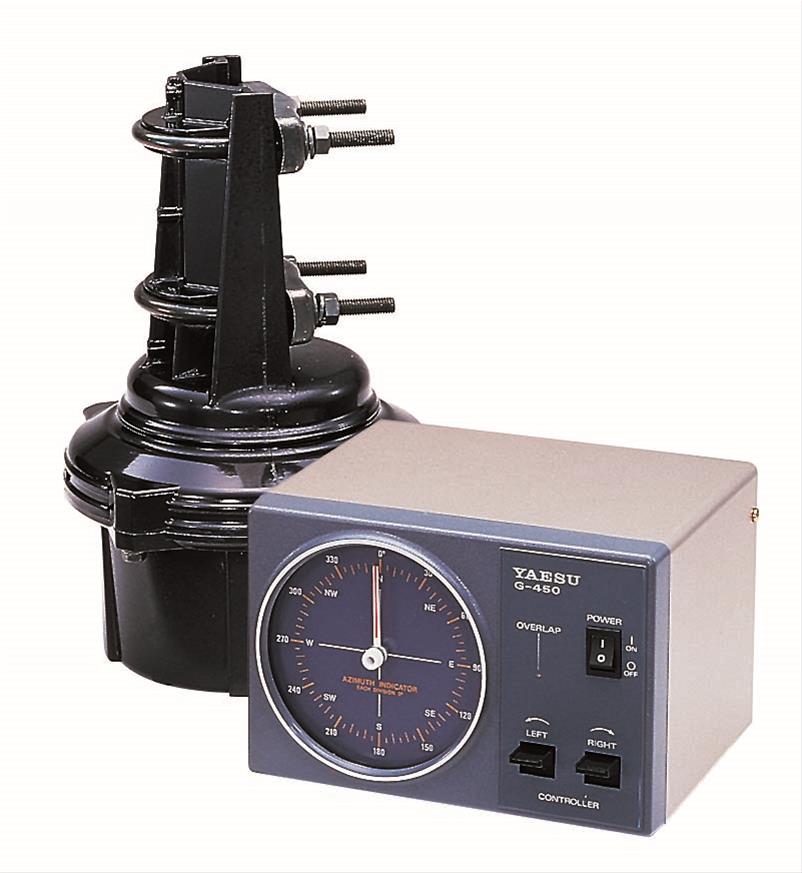
The goal is to finally get around to building the NOS TAPR trakbox kit I bought a couple of years ago and see if that will work to control my KR-500 el rotor and this new AZ rotor together. Should be doable.

If not, then need to get another controller to finally allow some automation in the shack.

Thus, I finally decided to bite the bullet and get a new rotor, for the sake of sanity and time, a Yaesu G-450A
If not, then need to get another controller to finally allow some automation in the shack.
Friday, March 15, 2019
Fox In A Box
Fox in Box... no, not a Dr. Seuss rhyming story, but a pre-configured software distribution of the fox satellite telemetry software.
http://burnsfisher.com/AMSAT/FoxInABox/Building%20The%20Fox-in-a-Box.pdf
Building The Fox-in-a-Box(FIAB)Raspberry Pi Telemetry Station,
Burns Fisher, WB1FJ ,Chris Thompson G0KLA/AC2CZ
I really don't know the full history here, but I put together a 7" screen, Raspberry Pi 3, RTL-SDR receiver, and this pre-configured SD card containing an image that was essentially plug-reboot-and-play.
I originally hooked this up to my 2m/70cm MFJ groundplane, but that seems to have been compromised and does not deliver a strong enough signal. Not sure of the coax has been damaged but I noticed a degradation of signals first when I had my HP Stream tablet setup to receive NOAA WX images. Using this, I had only been able to pull maybe a dozen packets a week with FIAB.
Right now, I've shifted to a fixed orientation of my elk log periodic, just pointing NW at around 30 degree elevation, and am picking up dozens of packets a day across AO-85, 91 and 92, ... I think I picked up 1 packet from AO-95 when I caught a good pass and tracked the satellite directly by hand.
Eventually I'm going to change to yet another antenna and computer controlled tracking.
To that end, I'm putting my gasping U-100 az rotor to bed. Both the manual controller and the rotor itself need serious troubleshooting, and I just don't have the time. These will go into storage until I retire and can take on the project of fixing them. In the meantime, I ordered a Yaesu G-450A to go along with my nicely working Kenpro KR-500 elevation rotor.
Next up after getting that working will be to finally try building the "New Old Stock" TAPR Trakbox kit I purchased last year (was it last or 2 years ago???).
In the meantime, my current Fox Telemetry standings are:
#333 KA2CZU
and the last sat I collected data on was:
AO-92 (Fox-1D) | latest spacecraft health | Camera Images
Frames: 65,175 - last 24 hours: 6,819 - last 90 mins: 867
From ground stations:
SQ5WAF TI2RF K4OZS N8MH N9IP WA4SCA K4RGK KK4YEL KO4MA KB5SQG W8MRR KB2ESY NA5SS N5ZNL K9EK-FIAB K3ADA W2MMD wc7v-dn46 K3RLD-RPi K9JKM WB1FJ-main W1EME W2JTM KA2CZU KD8TBD
Happy Sat Hunting everyone and 73!
http://burnsfisher.com/AMSAT/FoxInABox/Building%20The%20Fox-in-a-Box.pdf
Building The Fox-in-a-Box(FIAB)Raspberry Pi Telemetry Station,
Burns Fisher, WB1FJ ,Chris Thompson G0KLA/AC2CZ
I really don't know the full history here, but I put together a 7" screen, Raspberry Pi 3, RTL-SDR receiver, and this pre-configured SD card containing an image that was essentially plug-reboot-and-play.
I originally hooked this up to my 2m/70cm MFJ groundplane, but that seems to have been compromised and does not deliver a strong enough signal. Not sure of the coax has been damaged but I noticed a degradation of signals first when I had my HP Stream tablet setup to receive NOAA WX images. Using this, I had only been able to pull maybe a dozen packets a week with FIAB.
Right now, I've shifted to a fixed orientation of my elk log periodic, just pointing NW at around 30 degree elevation, and am picking up dozens of packets a day across AO-85, 91 and 92, ... I think I picked up 1 packet from AO-95 when I caught a good pass and tracked the satellite directly by hand.
Eventually I'm going to change to yet another antenna and computer controlled tracking.
To that end, I'm putting my gasping U-100 az rotor to bed. Both the manual controller and the rotor itself need serious troubleshooting, and I just don't have the time. These will go into storage until I retire and can take on the project of fixing them. In the meantime, I ordered a Yaesu G-450A to go along with my nicely working Kenpro KR-500 elevation rotor.
Next up after getting that working will be to finally try building the "New Old Stock" TAPR Trakbox kit I purchased last year (was it last or 2 years ago???).
In the meantime, my current Fox Telemetry standings are:
#333 KA2CZU
and the last sat I collected data on was:
AO-92 (Fox-1D) | latest spacecraft health | Camera Images
Frames: 65,175 - last 24 hours: 6,819 - last 90 mins: 867
From ground stations:
SQ5WAF TI2RF K4OZS N8MH N9IP WA4SCA K4RGK KK4YEL KO4MA KB5SQG W8MRR KB2ESY NA5SS N5ZNL K9EK-FIAB K3ADA W2MMD wc7v-dn46 K3RLD-RPi K9JKM WB1FJ-main W1EME W2JTM KA2CZU KD8TBD
Happy Sat Hunting everyone and 73!
Friday, February 22, 2019
SSTV Images received from the ISS
ARISS was running another special ISS SSTV event, using the transmitter in the russian module.
Received a number of images using a TH-D72A and a whip antenna (too lazy to pull out my elk log periodic :) )


Received a number of images using a TH-D72A and a whip antenna (too lazy to pull out my elk log periodic :) )


Thursday, February 14, 2019

Wednesday, November 28, 2018
L/V mode
Allright, I did it!
After getting scammed into getting 2 (count'em 2) chinese 1.2GHz yagis (long story), I finally
saw the Black Friday price of an Alinco DJ-G7T on HRO and did it!
Picked up the HT and once my wife gets over it, it'll be onto AO-92 L/V mode.
After getting scammed into getting 2 (count'em 2) chinese 1.2GHz yagis (long story), I finally
saw the Black Friday price of an Alinco DJ-G7T on HRO and did it!
Picked up the HT and once my wife gets over it, it'll be onto AO-92 L/V mode.
Thursday, September 06, 2018
NO-84 APRS
is alive and well... but just not populated by many real live ops! :(
00:00:21:25 : PSAT]APWW10,KJ4ERJ-15,TCPIP*,qAS,KJ4ERJ-15::KA2CZU-2 :E^66 SE LOS 5m56s{LL}
00:00:21:45 : W4TBD-6]CQ,PSAT,ARISS*,SGATE,FM17DK,qAR,KG4PID-14::K3RRR :73 de Ed W4TBD w4tbd@arrl.net VA FM17dk
00:00:23:01 : PSAT]APWW10,KJ4ERJ-15,TCPIP*,qAS,KJ4ERJ-15::KA2CZU-2 :E^66 SE LOS 5m56s{LL}
00:00:23:40 : PSAT]APRSON,ARISS,qAR,KG4PID-14:s#033888,0z000
00:00:23:44 : W4TBD-6]CQ,PSAT,ARISS*,SGATE,FM17DK,qAR,KG4PID-14:=3726.20N/07742.21W-73' Via ISS w4tbd@arrl.net FM17dk IGate WLNK-1
00:00:24:05 : PSAT]APWW10,KJ4ERJ-15,TCPIP*,qAS,KJ4ERJ-15::KA2CZU-2 :E^66 SE LOS 5m56s{LL}
00:00:24:17 : W4TBD-6]CQ,PSAT,ARISS*,SGATE,FM17DK,qAR,KG4PID-14::K3RRR :73 de Ed W4TBD w4tbd@arrl.net VA FM17dk
00:00:24:33 : KA2CZU-2]3Y5W7S,PSAT,ARISS*,qAR,KD2PYB-1:`fRDl#UK\]KA2CZU-2 Rob FM29 Live OP=
00:00:24:38 : PSAT]APWW10,KJ4ERJ-15,TCPIP*,qAS,KJ4ERJ-15::KA2CZU-2 :E^66 SE LOS 5m56s{LL}
00:00:24:42 : K0KOC-7]3Y2S1Y,PSAT,ARISS*,qAR,KD2PYB-1:'i4wl #/]=
00:00:24:56 : KB2M-2]3YTU0V,PSAT,ARISS*,qAR,KG4PID-14:'g]'l `/]Live Op FM29=
00:00:25:13 : KA2CZU-2]APK003,PSAT,ARISS*,qAR,KD2PYB-1::PSAT :1{28
00:00:25:13 : PSAT]APWW10,TCPIP*,qAS,KJ4ERJ-15::KA2CZU-2 :ack28
00:00:25:13 : PSAT]APWW10,KJ4ERJ-15,TCPIP*,qAS,KJ4ERJ-15::KA2CZU-2 :E^66 SE LOS 5m56s{LL}
00:00:25:14 : KA2CZU-2]APK003,PSAT,ARISS*,qAR,KD2PYB-1::K0KOC-7 :FM29 in NJ{27
00:00:25:16 : KA2CZU-2]APK003,PSAT,ARISS*,qAR,KG4PID-14::KB2HSH :TNX es 73{25
00:00:26:57 : KB2M-2]3YTU0V,PSAT,ARISS*,qAR,WA8LMF-SG:'g]'l `/]Live Op FM29=
00:00:28:18 : W4TBD-6]CQ,PSAT,ARISS*,SGATE,FM17DK,qAR,KG4PID-14:=3726.20N/07742.21W-73' Via ISS w4tbd@arrl.net FM17dk IGate WLNK-1
00:00:28:37 : KA2CZU-2]3Y5W7S,PSAT,ARISS*,qAR,W0ARP-15:`fRDl"yK\]KA2CZU-2 Rob FM29 Live OP=
www1.findu.com
findU needs your help Amateur Radio Stations heard via Satellite. This
page captures downlink packets from the APRS enabled unmanned
satellites.
00:00:21:45 : W4TBD-6]CQ,PSAT,ARISS*,SGATE,FM17DK,qAR,KG4PID-14::K3RRR :73 de Ed W4TBD w4tbd@arrl.net VA FM17dk
00:00:23:01 : PSAT]APWW10,KJ4ERJ-15,TCPIP*,qAS,KJ4ERJ-15::KA2CZU-2 :E^66 SE LOS 5m56s{LL}
00:00:23:40 : PSAT]APRSON,ARISS,qAR,KG4PID-14:s#033888,0z000
00:00:23:44 : W4TBD-6]CQ,PSAT,ARISS*,SGATE,FM17DK,qAR,KG4PID-14:=3726.20N/07742.21W-73' Via ISS w4tbd@arrl.net FM17dk IGate WLNK-1
00:00:24:05 : PSAT]APWW10,KJ4ERJ-15,TCPIP*,qAS,KJ4ERJ-15::KA2CZU-2 :E^66 SE LOS 5m56s{LL}
00:00:24:17 : W4TBD-6]CQ,PSAT,ARISS*,SGATE,FM17DK,qAR,KG4PID-14::K3RRR :73 de Ed W4TBD w4tbd@arrl.net VA FM17dk
00:00:24:33 : KA2CZU-2]3Y5W7S,PSAT,ARISS*,qAR,KD2PYB-1:`fRDl#UK\]KA2CZU-2 Rob FM29 Live OP=
00:00:24:38 : PSAT]APWW10,KJ4ERJ-15,TCPIP*,qAS,KJ4ERJ-15::KA2CZU-2 :E^66 SE LOS 5m56s{LL}
00:00:24:42 : K0KOC-7]3Y2S1Y,PSAT,ARISS*,qAR,KD2PYB-1:'i4wl #/]=
00:00:24:56 : KB2M-2]3YTU0V,PSAT,ARISS*,qAR,KG4PID-14:'g]'l `/]Live Op FM29=
00:00:25:13 : KA2CZU-2]APK003,PSAT,ARISS*,qAR,KD2PYB-1::PSAT :1{28
00:00:25:13 : PSAT]APWW10,TCPIP*,qAS,KJ4ERJ-15::KA2CZU-2 :ack28
00:00:25:13 : PSAT]APWW10,KJ4ERJ-15,TCPIP*,qAS,KJ4ERJ-15::KA2CZU-2 :E^66 SE LOS 5m56s{LL}
00:00:25:14 : KA2CZU-2]APK003,PSAT,ARISS*,qAR,KD2PYB-1::K0KOC-7 :FM29 in NJ{27
00:00:25:16 : KA2CZU-2]APK003,PSAT,ARISS*,qAR,KG4PID-14::KB2HSH :TNX es 73{25
00:00:26:57 : KB2M-2]3YTU0V,PSAT,ARISS*,qAR,WA8LMF-SG:'g]'l `/]Live Op FM29=
00:00:28:18 : W4TBD-6]CQ,PSAT,ARISS*,SGATE,FM17DK,qAR,KG4PID-14:=3726.20N/07742.21W-73' Via ISS w4tbd@arrl.net FM17dk IGate WLNK-1
00:00:28:37 : KA2CZU-2]3Y5W7S,PSAT,ARISS*,qAR,W0ARP-15:`fRDl"yK\]KA2CZU-2 Rob FM29 Live OP=
Monday, July 30, 2018
recent Sats
Finally been carving out time to get on the relatively "recent" Satellites, AO-91 and AO-92, as well as try SO-50 and AO-85. The latter 2 have both presented challenges and AO-92's schedule hasn't been cooperating with my daytime schedule.
That leaves AO-91, and I'm finally feeling like I am getting a "feel" for the rhythm of good FM "repeater in the sky" QSOs.
Getting confirmations are another thing.
Doing this all with 2 hands is a third thing.
BUT... I'm getting there.
Elk antenna, TH-D72A, pad and pen. ISS detector w/Ham extensions (though the lunchtime pass of SO-50 seemed way screwed up... near LOS the app was showing a 20 deg + elevation which both the downlink signal strenth and common sense told me was nonsense, all other sats have seemed right on target)
So, getting some contacts in the log, if not too many confirmations.
That leaves AO-91, and I'm finally feeling like I am getting a "feel" for the rhythm of good FM "repeater in the sky" QSOs.
Getting confirmations are another thing.
Doing this all with 2 hands is a third thing.
BUT... I'm getting there.
Elk antenna, TH-D72A, pad and pen. ISS detector w/Ham extensions (though the lunchtime pass of SO-50 seemed way screwed up... near LOS the app was showing a 20 deg + elevation which both the downlink signal strenth and common sense told me was nonsense, all other sats have seemed right on target)
So, getting some contacts in the log, if not too many confirmations.
Monday, July 23, 2018
Contact
ok, been a while since I posted.
It was a longer while since I actually tried to make 2 way contacts on the sats. Just too many pans in the fire.
That said, finally got out last week for some AO-91 and AO-92 passes. Great weather (hot), a few breaks from work, and some halfway decent passes.
The rig of choice was the simplest possible arrangement I could come up with:
- Kenwood TH-D72A
- Pryme Radio AL-800 telescoping 2m/70cm antenna

Note that the AL-800 I have came with a BNC connector, so I picked up a SMA-BNC connector that screws flush with the D72A such that it makes a firm mount... not depending on the thinner sma connector but snugged up against the D72A's shell nicely.

So, with that combo I've found some good and bad.
The good is that both AO-91 and AO-92 hear well enough for this to be a viable setup... provided it's not too busy a pass. I use an earbud and am running full duplex, but with a very busy pass you still wind up occasionally stepping on someone else. This antenna does not provide quite enough gain to hit lower angles from my locations, not capture the sat easily when there are a lot of folks *not* running full duplex, but not strong enough themselves to be heard.
All in all made a few contacts, had some fun.
Now back to bringing my elk log periodic yagi along for the ride :D
It was a longer while since I actually tried to make 2 way contacts on the sats. Just too many pans in the fire.
That said, finally got out last week for some AO-91 and AO-92 passes. Great weather (hot), a few breaks from work, and some halfway decent passes.
The rig of choice was the simplest possible arrangement I could come up with:
- Kenwood TH-D72A
- Pryme Radio AL-800 telescoping 2m/70cm antenna
Note that the AL-800 I have came with a BNC connector, so I picked up a SMA-BNC connector that screws flush with the D72A such that it makes a firm mount... not depending on the thinner sma connector but snugged up against the D72A's shell nicely.
So, with that combo I've found some good and bad.
The good is that both AO-91 and AO-92 hear well enough for this to be a viable setup... provided it's not too busy a pass. I use an earbud and am running full duplex, but with a very busy pass you still wind up occasionally stepping on someone else. This antenna does not provide quite enough gain to hit lower angles from my locations, not capture the sat easily when there are a lot of folks *not* running full duplex, but not strong enough themselves to be heard.
All in all made a few contacts, had some fun.
Now back to bringing my elk log periodic yagi along for the ride :D
Monday, May 07, 2018
FM Satellite Frequency Summary and Programming Charts
FM Satellite Frequency Summary and Programming Charts
SO-50
Channel
#
|
Alpha
|
TX Freq
|
TX Tone
|
RX Freq
|
RX Tone
|
501
|
50 +2
|
145.850
|
67.0
|
436.805
|
None
|
502
|
50 +1
|
145.850
|
67.0
|
436.800
|
None
|
503
|
50 74
|
145.850
|
74.4
|
436.795
|
None
|
504
|
SO-50
|
145.850
|
67.0
|
436.795
|
None
|
505
|
50 -1
|
145.850
|
67.0
|
436.790
|
None
|
506
|
50 -2
|
145.850
|
67.0
|
436.785
|
None
|
AO-91 (Fox-1B)
911
|
AOS 2
|
435.240
|
67.0
|
145.960
|
None
|
912
|
AOS 1
|
435.245
|
67.0
|
145.960
|
None
|
913
|
AO-91
|
435.250
|
67.0
|
145.960
|
None
|
914
|
LOS 1
|
435.255
|
67.0
|
145.960
|
None
|
915
|
LOS 2
|
435.260
|
67.0
|
145.960
|
None
|
AO-92 (Fox-1D)
921
|
AOS 2
|
435.340
|
67.0
|
145.880
|
None
|
922
|
AOS 1
|
435.345
|
67.0
|
145.880
|
None
|
923
|
AO-92
|
435.350
|
67.0
|
145.880
|
None
|
924
|
LOS 1
|
435.355
|
67.0
|
145.880
|
None
|
925
|
LOS 2
|
435.360
|
67.0
|
145.880
|
None
|
AO-85 (Fox-1A)
Fox-1A
Doppler Shift Correction
|
Your
Transmit Frequency (with 67 Hz tone)
|
Your
Receive Frequency
|
AOS
(Mem.1)
|
435.170
MHz
|
145.980
MHz
|
Approaching
(Mem.2)
|
435.175
MHz
|
145.980
MHz
|
Passing
(Mem.3)
|
435.180
MHz
|
145.980
MHz
|
Departing
(Mem.4)
|
435.185
MHz
|
145.980
MHz
|
LOS
(Mem.5)
|
435.190
MHz
|
145.980
MHz
|
Fox-1 Series UHF Transmit Doppler Shift Correction
Transmit
with
|
67 Hz
CTCSS on all
|
uplink
frequencies
|
Fox-1A
(AO-85)
|
Receive
145.980
|
RadFsSat/Fox-1B
|
(AO-91)
|
Receive
145.960
|
Fox-1Cliff
|
Receive
145.920
|
Fox-1D
(AO-92)
|
Receive
145.880
|
AOS
(Mem.1)
|
Fc - 10
KHz *
|
Fc - 10
KHz
|
Fc - 10
KHz
|
Fc - 10
KHz
|
Approaching
(Mem.2)
|
Fc - 5
KHz
|
Fc - 5
KHz
|
Fc - 5
Khz
|
Fc - 5
KHz
|
Nearest
(Mem.3)
|
Fc =
435.170 MHz
|
Fc =
435.250 MHz
|
Fc =
435.300 MHz
|
Fc =
435.350 MHz
|
Departing
(Mem.4)
|
Fc + 5
KHz
|
Fc + 5
KHz
|
Fc + 5
KHz
|
Fc + 5
Khz
|
LOS
(Mem.5)
|
Fc + 10
KHz
|
Fc + 10
KHz
|
Fc + 10
KHz
|
Fc + 10
KHz
|
Frequencies for Fox-1A, B, Cliff, and D
Uplink
FM (67 Hz tone)
|
Downlink
FM
|
|
Fox-1A
(AO-85)
|
435.170
MHz
|
145.980
MHz
|
Fox-1B
(AO-91) / RadFxSat
|
435.250
MHz
|
145.960
MHz
|
Fox-1Cliff*
|
435.300
MHz / 1267.300 MHz **
|
145.920
MHz
|
Fox-1D
(AO-92)*
|
435.350
MHz / 1267.350 MHz **
|
145.880
MHz
|
|
AMSAT Fox-1 Satellites
|
||||
|
|
Uplink FM
|
Downlink FM
|
Comments
|
|
|
(67 Hz CTCSS)
|
||||
|
|
||||
|
AO-85 (Fox-1A)
|
435.170 MHz
|
145.980 MHz
|
Operational
|
|
|
AO-91 (RadFxSat /
Fox-1B)
|
435.250 MHz
|
145.960 MHz
|
Operational
|
|
|
AO-92 (Fox-1D)
|
435.350 MHz &
|
145.880 MHz
|
Operational
|
|
|
1267.359 MHz*
|
||||
|
|
||||
|
Fox-1Cliff
|
435.300 MHz &
|
145.920 MHz
|
Launch Summer 2018
|
|
|
1267.300 MHz*
|
||||
|
|
||||
|
* Switchable by command station. Not operational simultaneously.
|
||||
|
SO-50 (SaudiSat-1C)
|
||||
|
|
Uplink FM
|
Downlink FM
|
Comments
|
|
|
(67 Hz CTCSS)
|
||||
|
|
||||
|
SO-50
|
145.850 MHz
|
436.795 MHz
|
Operational
|
|
|
SO-50 also has a 10
minute timer that must be armed before use. Transmit a 2 second carrier with
a CTCSS tone of 74.4 Hz to arm the timer.
|
||||
|
CAS-3H (LilacSat-2)
|
||||
|
|
Uplink FM
|
Downlink FM
|
Comments
|
|
|
CAS-3H (LilacSat-2)
|
144.350 MHz
|
437.200 MHz
|
Operational
|
|
|
When FM transponder is
not on, there is a telemetry beacon on 437.200 MHz (LilacSat-2 Home Page). The FM transponder is on no set schedule.
For real time updates about which mode the satellite is in, see the AMSAT Live OSCAR Satellite Status Page
|
||||
|
IO-86 (LAPAN-A2)
|
||||
|
|
Uplink FM
|
Downlink FM
|
Comments
|
|
|
(88.5 Hz CTCSS)
|
||||
|
|
||||
|
IO-86 (LAPAN-A2)
|
145.880 MHz
|
435.880 MHz
|
Operational
|
|
|
FUNcube on ESEO
|
||||
|
|
Uplink FM
|
Downlink FM
|
Comments
|
|
|
FUNcube on ESEO
|
1263.500 MHz
|
145.895 MHz
|
Launch 2018
|
|
|
Also downlinks 4k8
BPSK telemetry
|
||||
|
Duchifat3
|
||||
|
|
Uplink FM
|
Downlink FM
|
Comments
|
|
|
Duchifat3
|
145.970 MHz
|
436.400 MHz
|
Launch Late 2018
|
|
|
Also downlinks 9k6
BPSK AX.25 telemetry 437.475 MHz. Possible 145.825 MHz APRS transceiver.
|
||||
|
K2SAT
|
||||
|
|
Uplink FM
|
Downlink FM
|
Comments
|
|
|
K2SAT
|
145.980 MHz
|
435.835 MHz
|
Launch H2 2018
|
|
|
Telemetry downlink
435.835 MHz. Data downlink 2404 MHz (2 mbps QPSK).
|
||||
|
Diwata-2
|
||||
|
|
Uplink FM
|
Downlink FM
|
9Comments
|
|
|
Diwata-2
|
43X.XXX MHz
|
145.XXX MHz
|
Launch Q2 2018
|
|
|
Also includes APRS and
a CW beacon.
|
||||
Subscribe to:
Posts (Atom)